📦 Inventory & Assets
Open Inventory to track supplies and stock, record purchase orders, count what is on the shelf, and keep the practice's equipment on the books as fixed assets.
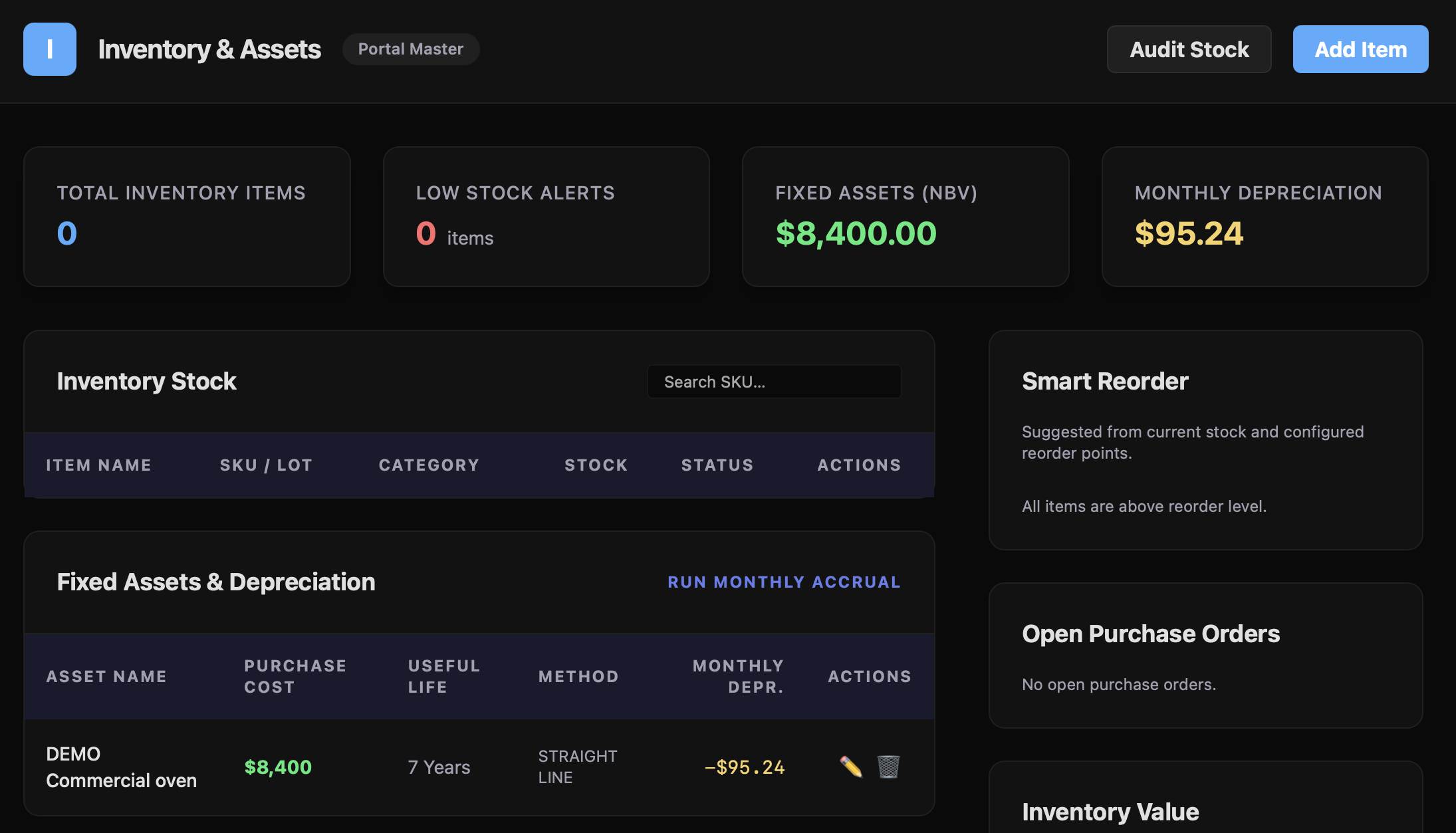
Stock and reorder levels
Each item has a name, SKU, category, quantity on hand, reorder level, and unit cost. Use Add Item for a new item, the pencil on a row to change one, and Search SKU to find an item before adding a duplicate.
- Low Stock Alerts counts the items at or below their reorder level.
- Smart Reorder lists the first five of them, each with its quantity on hand, its reorder level, and an Order button.
- Inventory Value shows the total on-hand value: unit cost × quantity on hand for every item, fixed assets included.
Fixed assets are not stock: they are left out of the item count, low-stock alerts, and Smart Reorder.
Deleting an item that has purchase or count history archives it as discontinued, so its history stays on record.
Purchase orders
Order in Smart Reorder opens Create Purchase Order: enter the vendor's name, then one line per item with a quantity and unit cost (+ Add Line for more), and choose Create PO. Recent orders not yet received are listed under Open Purchase Orders. A purchase order is recorded in Synalux; it is not sent to the vendor.
Receive brings an order into stock: each item's quantity on hand goes up by the amount ordered, and the purchase is recorded in the ledger. Check Accounting before adding the same purchase by hand.
Stock counts
Audit Stock lists each item with its system quantity. Enter the Physical Count you found and choose Submit Audit. Each item's stock is set to the count, and the difference is booked to Inventory Variance in the ledger. An item whose count box is left blank is left unchanged, not read as zero.
Fixed assets and depreciation
Turn on Track this item as a fixed asset for equipment such as an oven, a vehicle, or a computer, then set:
- Unit cost: what the asset cost;
- Purchase date;
- Depreciation method: Straight line or Declining balance;
- Useful life (years);
- Salvage value: what the asset is expected to be worth at the end of its life.
Each asset's monthly depreciation is:
- Straight line: (cost − salvage value) ÷ (useful life in years × 12). An oven that cost $8,400 with a 7-year life and $400 salvage value depreciates $95.24 a month.
- Declining balance: (cost − depreciation so far) × 2 ÷ useful life ÷ 12, so it is larger in the early years.
Depreciation is rounded to the cent and stops when the asset reaches its salvage value.
The asset table shows each asset's monthly depreciation, and Monthly Depreciation is their total. Fixed Assets (NBV) is the net book value: each asset's cost less its depreciation so far, never below zero.
Posting depreciation
Run Monthly Accrual posts the current month's depreciation for every fixed asset. Depreciation also posts on its own on the 1st of each month, for the month that just ended, in every workspace with a fixed asset. It catches up a month that was skipped after the workspace's first posted month, up to 12 months back. A month that is already posted is not posted again.
Each accrual adds the month's amount to every asset's depreciation so far and posts one journal entry: debit Depreciation Expense, credit Accumulated Depreciation. If the chart of accounts is missing either account, the depreciation is recorded on the assets but not posted to the ledger, so check Accounting for the entry after running it.
Review the assets before running the accrual: a posted month changes the books.